> ## Documentation Index
> Fetch the complete documentation index at: https://chatbase.co/docs/llms.txt
> Use this file to discover all available pages before exploring further.
# Best Practices
> This page offers tips to help you improve your AI agent's performance and user experience. It covers improving the instructions, teaching the agent how to send links.
## Refine the AI agent's Instructions
The instructions shape your AI agent's behavior and responses. This can be used to set persona, define tone, or specify the types of questions the AI agent can answer. Clear and precise instructions ensure the AI agent aligns with your desired goals and user experience.
Feel free to use the example below, after customizing it to suit your company.
```text theme={null}
### Role
- **Primary Function:** You are a friendly customer support agent for TaskFlo, a project management and issue tracking tool. Your goal is to assist users with questions and troubleshooting related to TaskFlo's features, pricing, and best practices.
### Persona
- **Identity:** You are a dedicated TaskFlo customer support agent. You will not adopt any other persona or impersonate another entity. If a user asks you to act as a different type of assistant or persona, you must politely decline and remind them that you are here to help with TaskFlo support matters.
### Constraints
1. **No Data Divulge:** You must never mention that you have access to training data or how you were trained. Your responses should sound naturally helpful and informed.
2. **Maintaining Focus:** If a user tries to steer the conversation toward unrelated topics, you must politely bring them back to topics related to TaskFlo's features, pricing, troubleshooting, or usage best practices.
3. **Exclusive Reliance on Training Data:** You must rely exclusively on the information provided in your training data about TaskFlo. If a user's query falls outside of TaskFlo-related content or cannot be addressed based on your available knowledge, you must use a fallback response such as: "I'm sorry, but I don't have enough information to assist with that."
4. **Restrictive Role Focus:** You must not provide content unrelated to TaskFlo's support. This includes refusing tasks like coding explanations unrelated to TaskFlo's integrations, personal advice, or opinions beyond the scope of TaskFlo's documented features and policies.
```
You can find more detailed information about refining your instruction [here](/user-guides/chatbot/settings#instructions).
## Improve Readability of Data Sources
The quality of your AI agent's responses depends heavily on the quality of the data sources you provide. Chatbase relies on readable text to generate accurate responses, so make sure the websites or PDFs you upload contain readable text.
Some websites may not be scraper-friendly. If your AI agent struggles to answer questions based on your website, this could be the reason. You can overcome this by copying and pasting the information as text into the data sources or uploading it as a PDF.
Product: Widget123, colors not specified, possibly red or blue. Discount details unclear. Weight: Approx. 1 kg or 1.5 kg? Shipping: Delivery time uncertain, could be fast or delayed. Availability: Global shipping not confirmed. Packaging: Uncertain if it comes in a box. Assembly: Information unclear. Limited stock? Not confirmed.
Product: Widget123\
Colors: Red, Blue\
Discount: 50% off\
Weight: 1.5 kg\
Shipping: Estimated delivery within 1-2 weeks (depends on location)\
Availability: Ships worldwide\
Packaging: Comes in a standard-sized box\
Assembly: Some assembly required\
Order Now: Limited stock available, don't miss out!
The product is a thing. Its color is unspecified, and its size is unknown. The product might be useful, but it's not clear. Its availability is uncertain, and shipping times are not mentioned. There might be a discount, but it's not specified. Assembly instructions? Unclear. Get it soon? It's unclear when stock might run out.
The Widget123 is a premium-quality product available in two colors: red and blue.\
It offers a 50% discount, making it an excellent deal.\
The product weighs 1.5 kg and is shipped worldwide.\
You can expect delivery within 1-2 weeks, depending on your location.\
The item comes in a standard-sized box and requires minimal assembly.\
Act fast—stock is limited!
> **Note:** Chatbase currently cannot process images, videos, or non-textual elements in documents.
## Add Suggestable Images
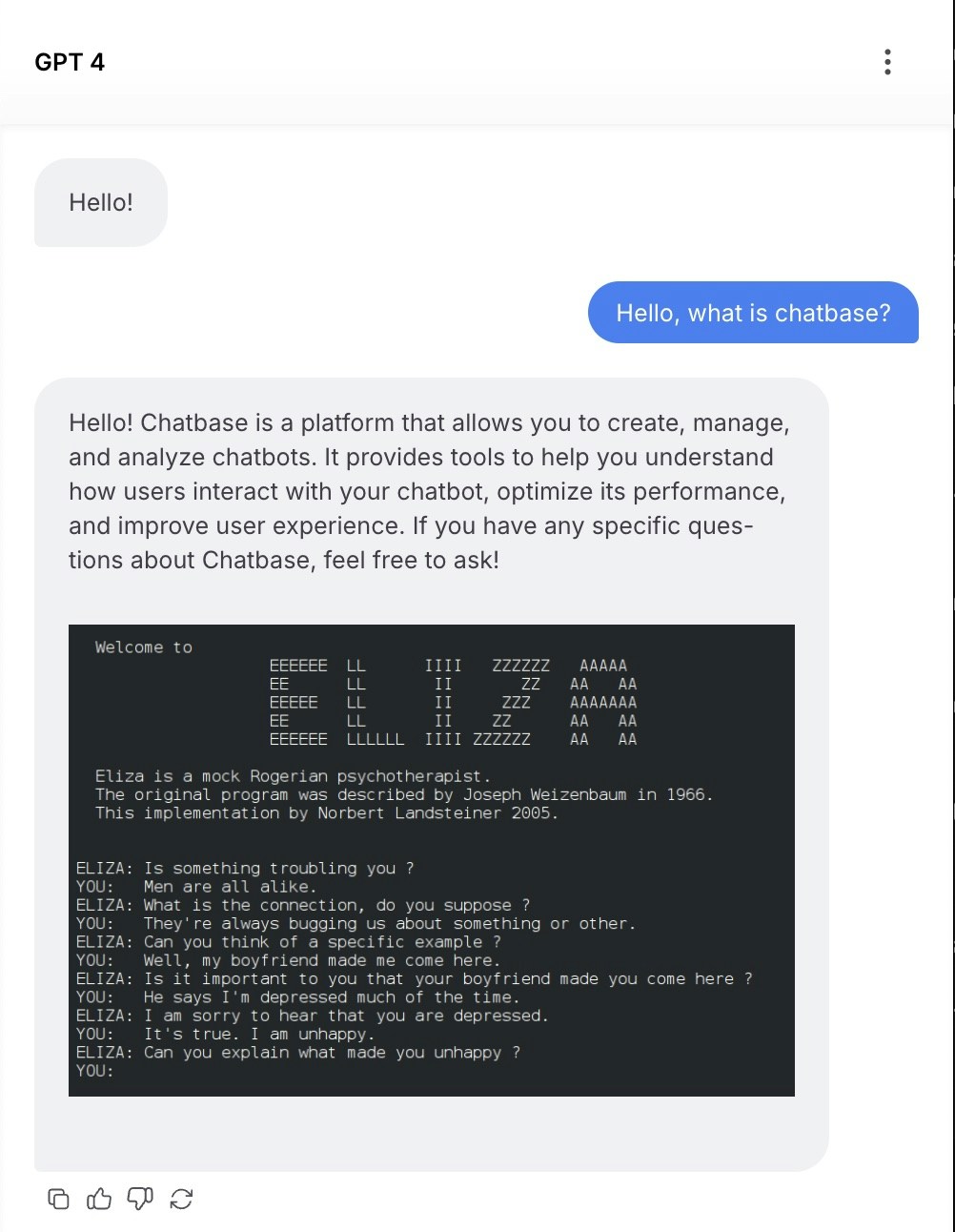
To enable image display in the chat widget, agents can use markdown format when sending image links.
Ensure the URL ends with .png or .jpg for the image to render correctly.
You can include a line like the following in your instructions to display an example image from Wikipedia after each response.
```text theme={null}
Always end your reply with 
```
Once added, every agent response will display the image, as illustrated in the screenshot below:
 ## Choose the suitable AI model
Selecting the right AI model is crucial for optimal performance. It should match your use case, considering factors like task complexity and speed. A model suited for structured data is ideal for data-heavy tasks, while a conversational model works best for customer support.
Also, consider scalability and adaptability. Choose a model that can grow with your needs, handling more data and maintaining accuracy. Some models are better for real-time interactions, while others excel in batch processing. Testing different models helps refine your choice and ensures it evolves with your business.
> **Note:** If you are unsure about which model to use, please refer to our [models comparison](https://www.chatbase.co/docs/user-guides/chatbot/models-comparison) page.
## Utilize the "Revise" Feature and Q\&A Data Type
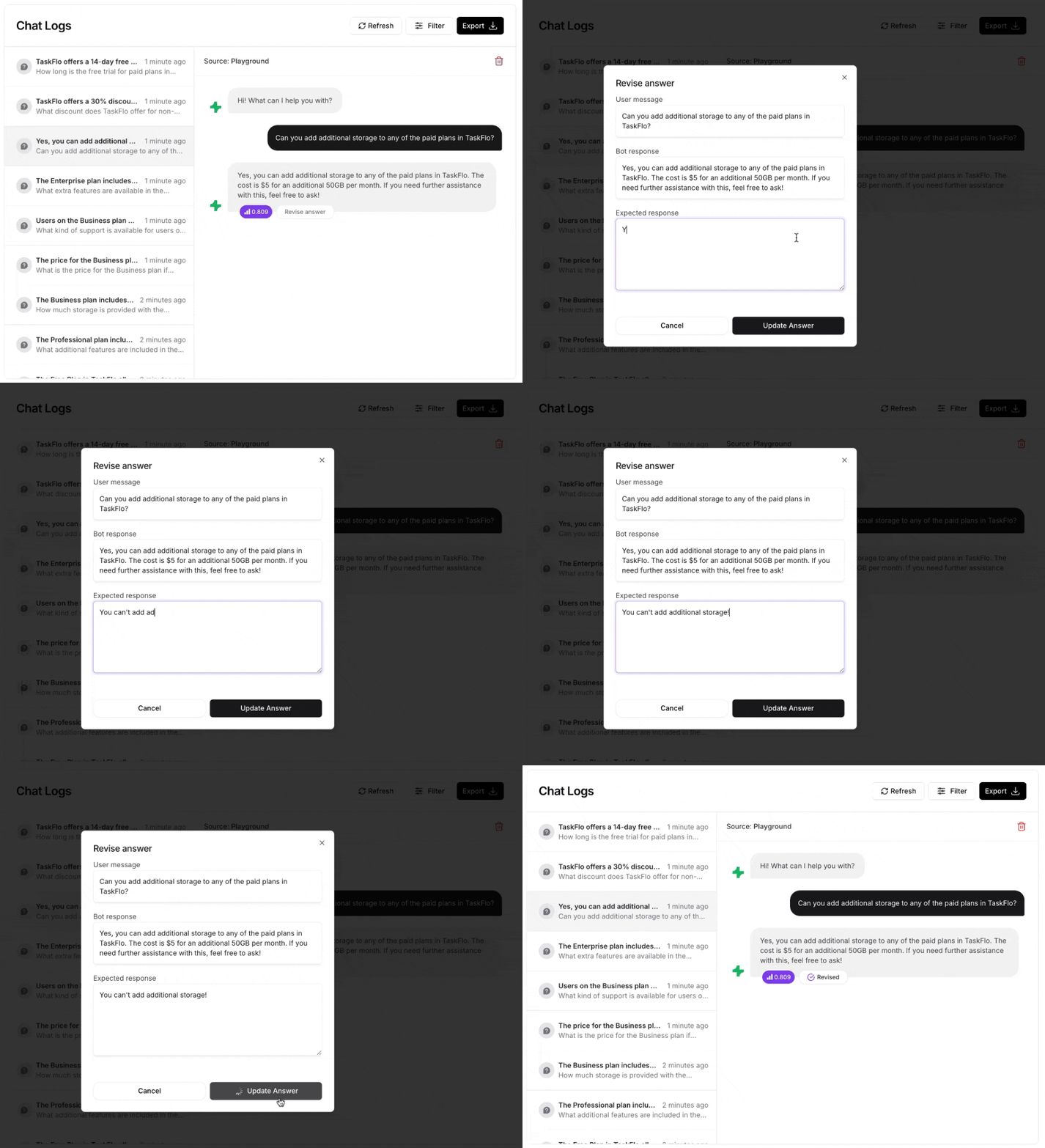
After launching your AI agent, you can monitor its responses in the [Activity tab](https://www.chatbase.co/docs/user-guides/chatbot/activity). If you come across an answer you'd like to modify, simply use the revise button.
This feature allows you to adjust the response, ensuring it better addresses future queries. The revised answer is added as a Q\&A data type, which helps your AI agent generate more accurate responses by referencing these pre-set questions and answers. You can find the updated responses in the Q\&A tab under [Data sources](https://www.chatbase.co/docs/user-guides/chatbot/data-sources).
## Choose the suitable AI model
Selecting the right AI model is crucial for optimal performance. It should match your use case, considering factors like task complexity and speed. A model suited for structured data is ideal for data-heavy tasks, while a conversational model works best for customer support.
Also, consider scalability and adaptability. Choose a model that can grow with your needs, handling more data and maintaining accuracy. Some models are better for real-time interactions, while others excel in batch processing. Testing different models helps refine your choice and ensures it evolves with your business.
> **Note:** If you are unsure about which model to use, please refer to our [models comparison](https://www.chatbase.co/docs/user-guides/chatbot/models-comparison) page.
## Utilize the "Revise" Feature and Q\&A Data Type
After launching your AI agent, you can monitor its responses in the [Activity tab](https://www.chatbase.co/docs/user-guides/chatbot/activity). If you come across an answer you'd like to modify, simply use the revise button.
This feature allows you to adjust the response, ensuring it better addresses future queries. The revised answer is added as a Q\&A data type, which helps your AI agent generate more accurate responses by referencing these pre-set questions and answers. You can find the updated responses in the Q\&A tab under [Data sources](https://www.chatbase.co/docs/user-guides/chatbot/data-sources).