> ## Documentation Index
> Fetch the complete documentation index at: https://chatbase.co/docs/llms.txt
> Use this file to discover all available pages before exploring further.
# Outbound Campaigns
> Send targeted messages to your contacts at scale. Create campaigns, personalize content, and track delivery in real time.
Outbound campaigns let you proactively reach out to your contacts at scale. Build targeted audiences, personalize message content using contact data, and track delivery in real time.
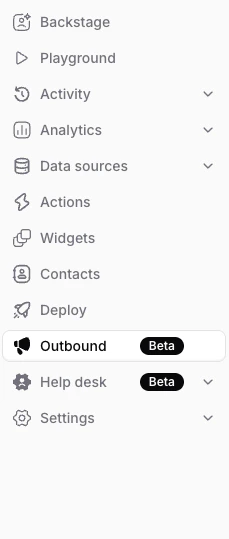
To get started, open your agent and click **Outbound** in the sidebar.
 ## Supported Channels
Send campaigns to your contacts using pre-approved WhatsApp message templates. Requires a connected WhatsApp integration and approved templates in Meta.
More channels are coming soon. WhatsApp is currently the only supported campaign channel.
## Key Features
Every outbound campaign — regardless of channel — includes:
* **Audience selection** — Choose recipients from your contact list. Search by name or phone number, and filter by custom attributes like subscription tier or region.
* **Content personalization** — Use contact fields (name, email, custom attributes) to personalize each message per recipient, or set static values for fixed content.
* **Reply behavior** — Choose how replies are handled:
* **AI Replies** (default) — Your AI agent responds automatically. Best for support questions and automated follow-ups.
* **Human Takeover** — Replies create helpdesk tickets tagged with the campaign name. Best for sales outreach and high-touch conversations.
* **Delivery tracking** — Monitor campaign progress in real time with a delivery funnel (Queued → Sent → Delivered → Read → Replied), recipient-level status, and error details for failures.
## How It Works
1. **Pick a channel** — Select the channel you want to send on (e.g., WhatsApp).
2. **Configure content** — Compose your message and personalize it with contact data.
3. **Select your audience** — Pick which contacts should receive the campaign.
4. **Send** — Launch the campaign and monitor delivery from the campaign detail page.
Replies are attributed to your campaign for **72 hours** after sending. After that window, incoming messages are treated as regular inbound conversations.
For a full step-by-step walkthrough, see the guide for your channel above.
## Supported Channels
Send campaigns to your contacts using pre-approved WhatsApp message templates. Requires a connected WhatsApp integration and approved templates in Meta.
More channels are coming soon. WhatsApp is currently the only supported campaign channel.
## Key Features
Every outbound campaign — regardless of channel — includes:
* **Audience selection** — Choose recipients from your contact list. Search by name or phone number, and filter by custom attributes like subscription tier or region.
* **Content personalization** — Use contact fields (name, email, custom attributes) to personalize each message per recipient, or set static values for fixed content.
* **Reply behavior** — Choose how replies are handled:
* **AI Replies** (default) — Your AI agent responds automatically. Best for support questions and automated follow-ups.
* **Human Takeover** — Replies create helpdesk tickets tagged with the campaign name. Best for sales outreach and high-touch conversations.
* **Delivery tracking** — Monitor campaign progress in real time with a delivery funnel (Queued → Sent → Delivered → Read → Replied), recipient-level status, and error details for failures.
## How It Works
1. **Pick a channel** — Select the channel you want to send on (e.g., WhatsApp).
2. **Configure content** — Compose your message and personalize it with contact data.
3. **Select your audience** — Pick which contacts should receive the campaign.
4. **Send** — Launch the campaign and monitor delivery from the campaign detail page.
Replies are attributed to your campaign for **72 hours** after sending. After that window, incoming messages are treated as regular inbound conversations.
For a full step-by-step walkthrough, see the guide for your channel above.