> ## Documentation Index
> Fetch the complete documentation index at: https://chatbase.co/docs/llms.txt
> Use this file to discover all available pages before exploring further.

# Translation

> Automatically detect and translate customer messages so your team can support anyone, in any language.

## Introduction

Translation lets your support team communicate with customers regardless of the language they write in. When enabled, the helpdesk automatically detects the language of incoming customer messages and offers one-click translation into your team's preferred language.

Only **customer messages** are translated. Agent replies remain in the language the agent writes them in.

## Enable Translation

<Steps>
  <Step title="Open translation settings">
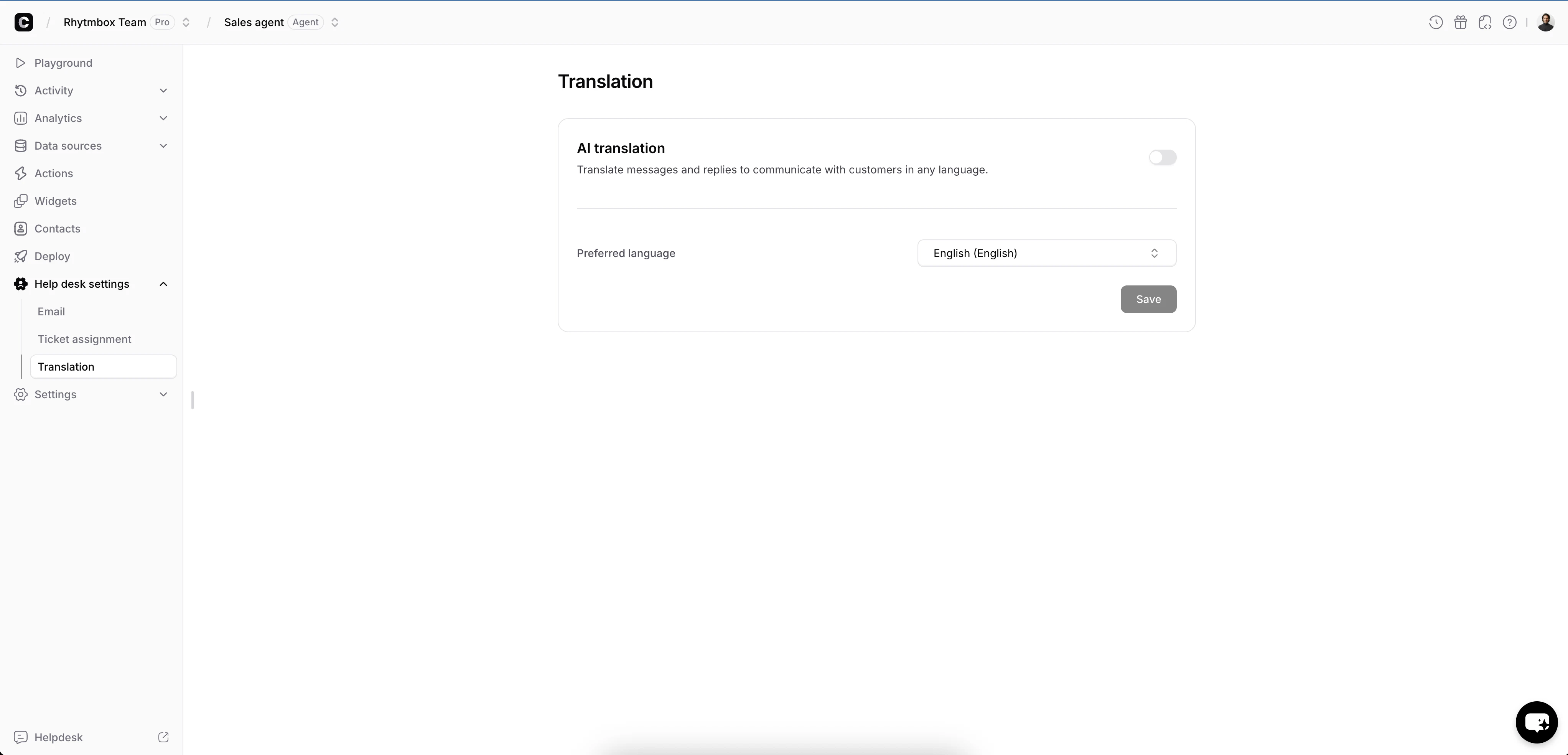
    Navigate to **Help desk settings** > **Translation** in the sidebar.
  </Step>

  <Step title="Enable AI translation">
    <Frame>
      <img src="https://mintcdn.com/chatbase/IdwsKzBZnpFWWv1e/user-guides/images/help-desk/translate/translation-enable.png?fit=max&auto=format&n=IdwsKzBZnpFWWv1e&q=85&s=2d45531e148c3465b820ec4a0c787def" alt="Translation settings page showing the Enable button and how-it-works overview" width="4088" height="1968" data-path="user-guides/images/help-desk/translate/translation-enable.png" />
    </Frame>
  </Step>

  <Step title="Choose your preferred language">
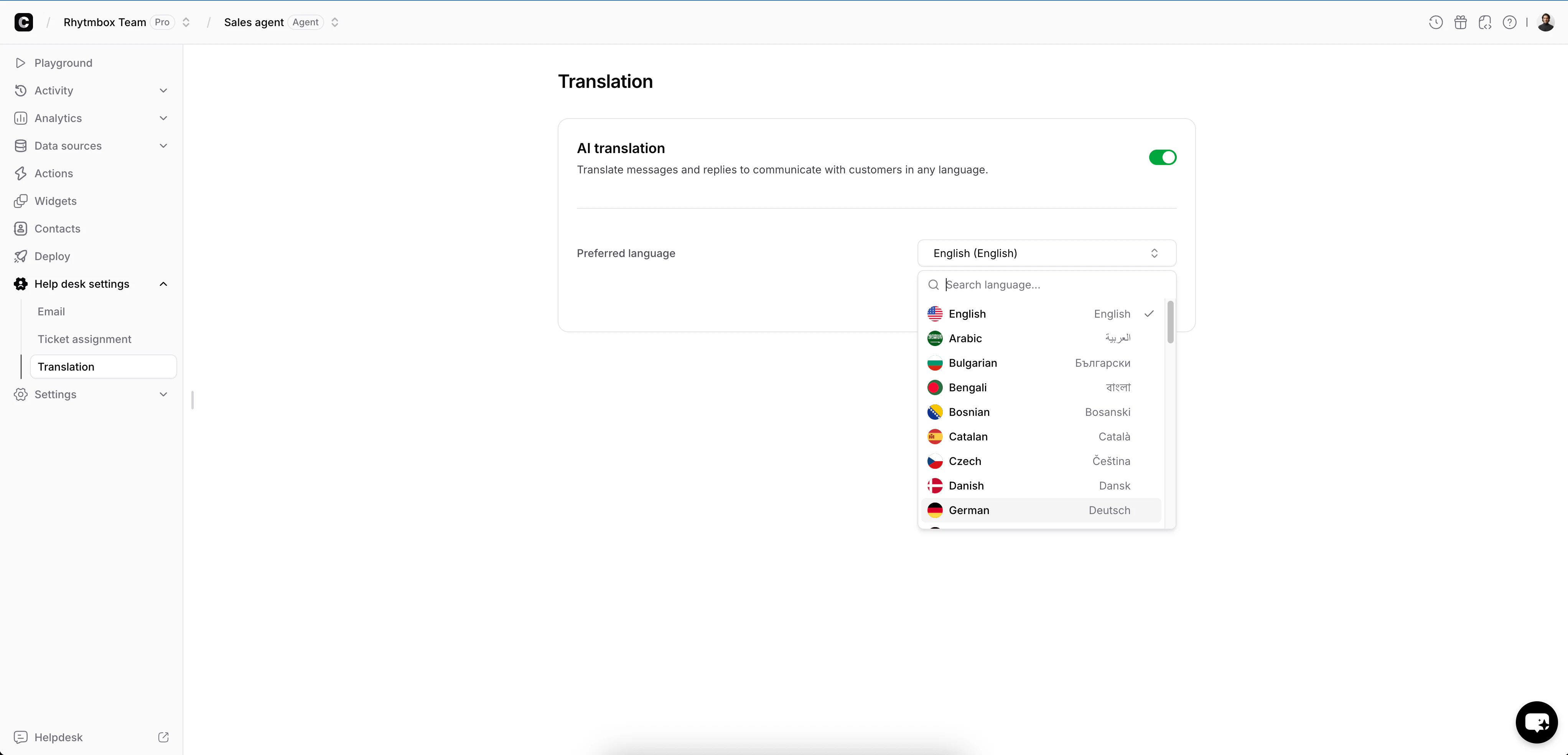
    Select your team's **Preferred language** from the dropdown - this is the language that customer messages will be translated into.

    <Frame>
      <img src="https://mintcdn.com/chatbase/IdwsKzBZnpFWWv1e/user-guides/images/help-desk/translate/translation-settings.png?fit=max&auto=format&n=IdwsKzBZnpFWWv1e&q=85&s=936e412997881757de6562d74d8293f0" alt="Translation settings with AI translation toggle enabled and preferred language set to English" width="4088" height="1968" data-path="user-guides/images/help-desk/translate/translation-settings.png" />
    </Frame>
  </Step>

  <Step title="Save">
    Click **Save** to apply your settings. Translation is now active for all tickets.
  </Step>
</Steps>

To disable translation at any time, toggle **AI translation** off and click **Save**.

## How Translation Works in Tickets

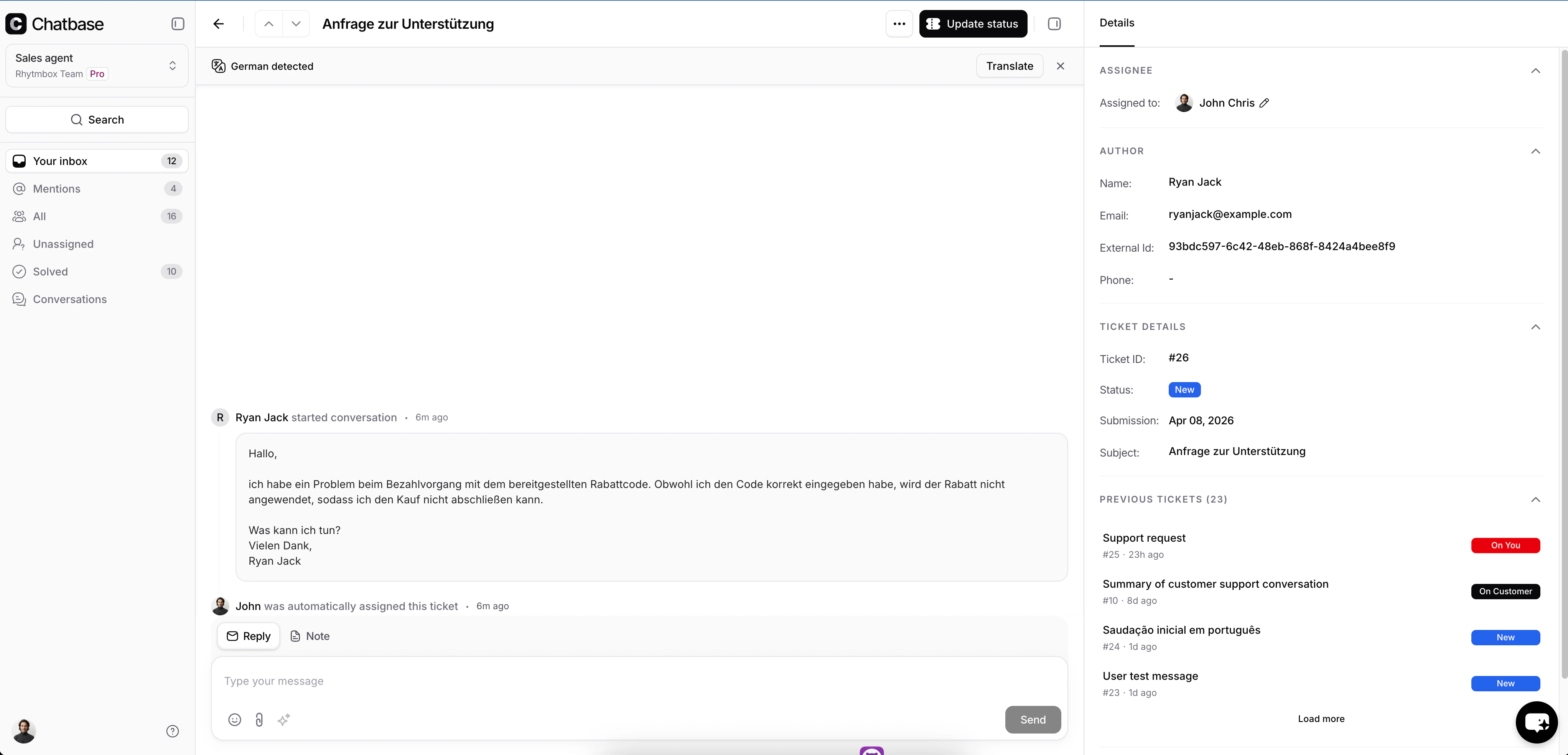
When you open a ticket from a customer who wrote in a different language, the helpdesk automatically detects the language and shows a **translation detection banner** at the top of the ticket.

### Before Translation

The banner displays the detected language (e.g., "Detected language: German") along with a **Translate** button. Customer messages appear in their original language.

<Frame>
  <img src="https://mintcdn.com/chatbase/IdwsKzBZnpFWWv1e/user-guides/images/help-desk/translate/translation-detected.png?fit=max&auto=format&n=IdwsKzBZnpFWWv1e&q=85&s=17da6aaf215ec480f12a9c5a33da6d97" alt="Ticket view showing a detected language banner with Arabic messages and a Translate button" width="4088" height="1968" data-path="user-guides/images/help-desk/translate/translation-detected.png" />
</Frame>

### After Translation

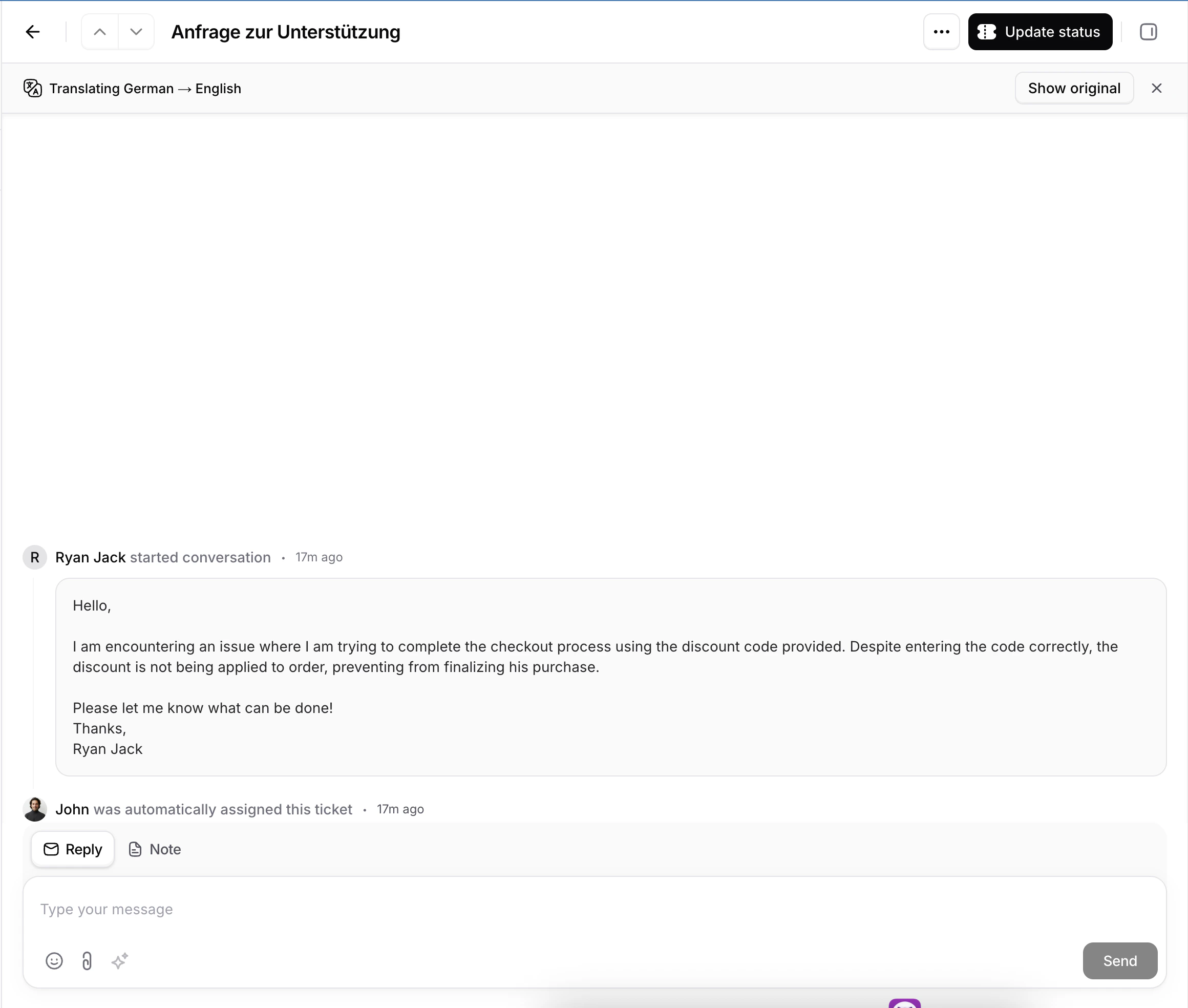
Click **Translate** to translate all customer messages into your preferred language. The banner updates to show the translation direction (e.g., "Translating German → English") and a **Show original** button appears so you can switch back at any time.

<Frame>
  <img src="https://mintcdn.com/chatbase/IdwsKzBZnpFWWv1e/user-guides/images/help-desk/translate/translation-translated.png?fit=max&auto=format&n=IdwsKzBZnpFWWv1e&q=85&s=28bb4213705c6603cb31ee55e81591db" alt="Ticket view showing translated messages in English with the Show original button" width="2320" height="1968" data-path="user-guides/images/help-desk/translate/translation-translated.png" />
</Frame>

<Info>
  If you are viewing a ticket with an active live chat, new incoming messages from the customer will be **translated automatically** as they arrive - no need to click Translate again.
</Info>

### Toggle Between Original and Translated

You can switch between the original and translated versions at any time using the buttons in the translation banner:

* **Show original** - displays the customer's messages in their original language
* **Translate** - switches back to the translated view

## What Gets Translated

| Content                                          | Translated? |
| ------------------------------------------------ | ----------- |
| Customer messages (email, widget, WhatsApp, API) | Yes         |
| Agent replies                                    | No          |
| Internal notes                                   | No          |
| System events (status changes, assignments)      | No          |

<Warning>
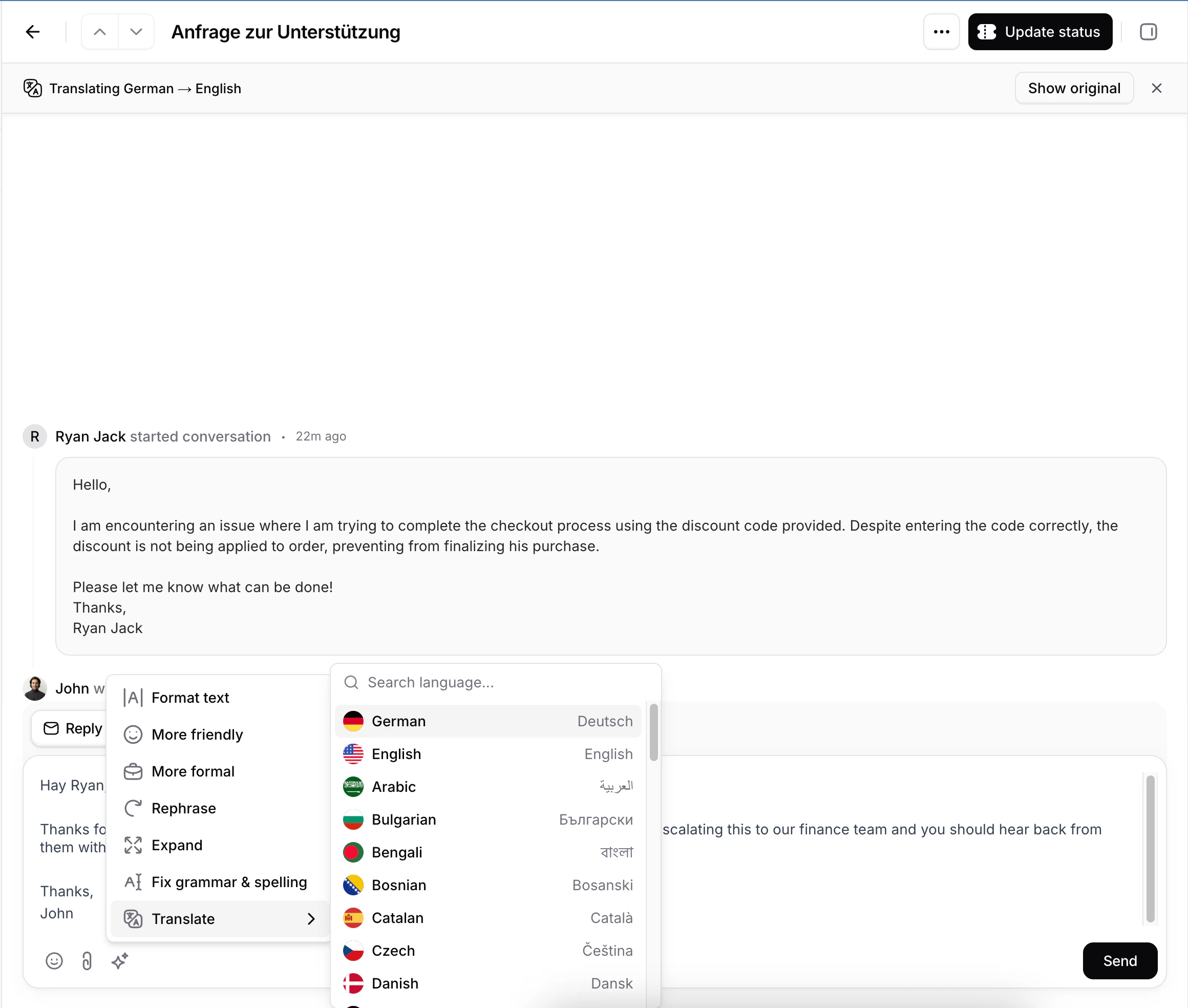
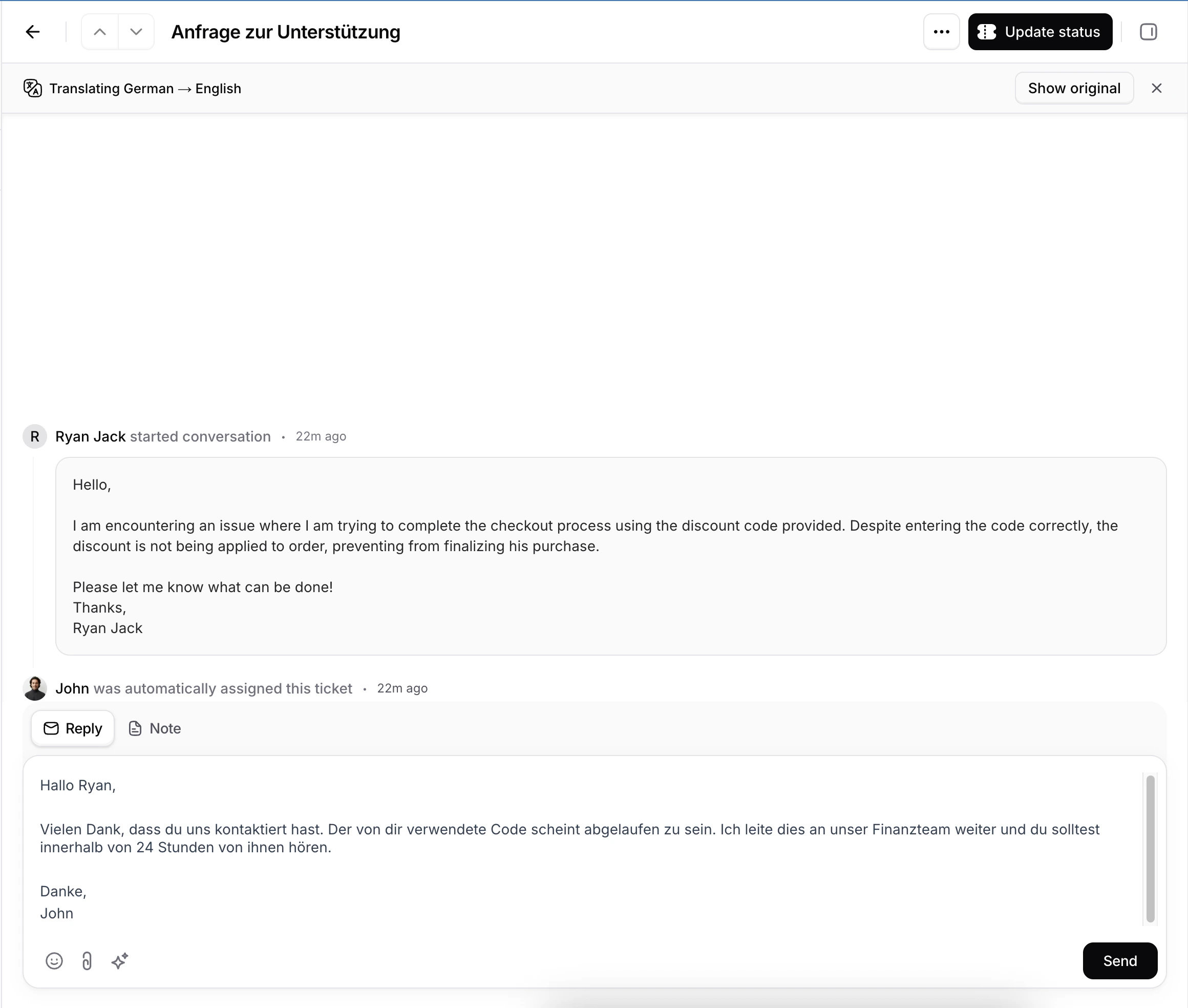
  Only customer messages are translated. Your replies are sent to the customer exactly as you write them. If you need to reply in the customer's language, use the **AI Compose > Translate** option in the message composer.

  <Frame>
    <img src="https://mintcdn.com/chatbase/IdwsKzBZnpFWWv1e/user-guides/images/help-desk/translate/ai-compose-translate-select.png?fit=max&auto=format&n=IdwsKzBZnpFWWv1e&q=85&s=d2f6ad7c7362934c4a0e351e9e2893af" alt="Ticket view showing translated messages in English with the Show original button" width="2320" height="1968" data-path="user-guides/images/help-desk/translate/ai-compose-translate-select.png" />
  </Frame>

  <Frame>
    <img src="https://mintcdn.com/chatbase/IdwsKzBZnpFWWv1e/user-guides/images/help-desk/translate/ai-compose-translated-text.png?fit=max&auto=format&n=IdwsKzBZnpFWWv1e&q=85&s=26d6cd43750e059be0f436b902be3cbb" alt="Ticket view showing translated messages in English with the Show original button" width="2320" height="1968" data-path="user-guides/images/help-desk/translate/ai-compose-translated-text.png" />
  </Frame>
</Warning>

## Supported Languages

Translation supports **49 languages**, including:

<Columns>
  <div>
    * Arabic
    * Bengali
    * Bulgarian
    * Bosnian
    * Catalan
    * Chinese (Simplified)
    * Chinese (Traditional)
    * Croatian
    * Czech
    * Danish
    * Dutch
    * English
    * Estonian
  </div>

  <div>
    * Finnish
    * French
    * German
    * Greek
    * Hebrew
    * Hindi
    * Hungarian
    * Indonesian
    * Italian
    * Japanese
    * Korean
    * Latvian
    * Lithuanian
  </div>

  <div>
    * Malay
    * Mongolian
    * Norwegian
    * Persian
    * Polish
    * Portuguese
    * Portuguese (Brazil)
    * Romanian
    * Russian
    * Serbian
    * Slovenian
    * Spanish
    * Swahili
  </div>

  <div>
    * Swedish
    * Thai
    * Turkish
    * Ukrainian
    * Vietnamese
  </div>
</Columns>

Right-to-left (RTL) languages such as Arabic, Hebrew, and Persian are fully supported.