> ## Documentation Index
> Fetch the complete documentation index at: https://chatbase.co/docs/llms.txt
> Use this file to discover all available pages before exploring further.
# Escalate to Human
This action allows the AI agent to escalate a conversation to a human support agent by creating a ticket in one of your integrated helpdesk platforms.
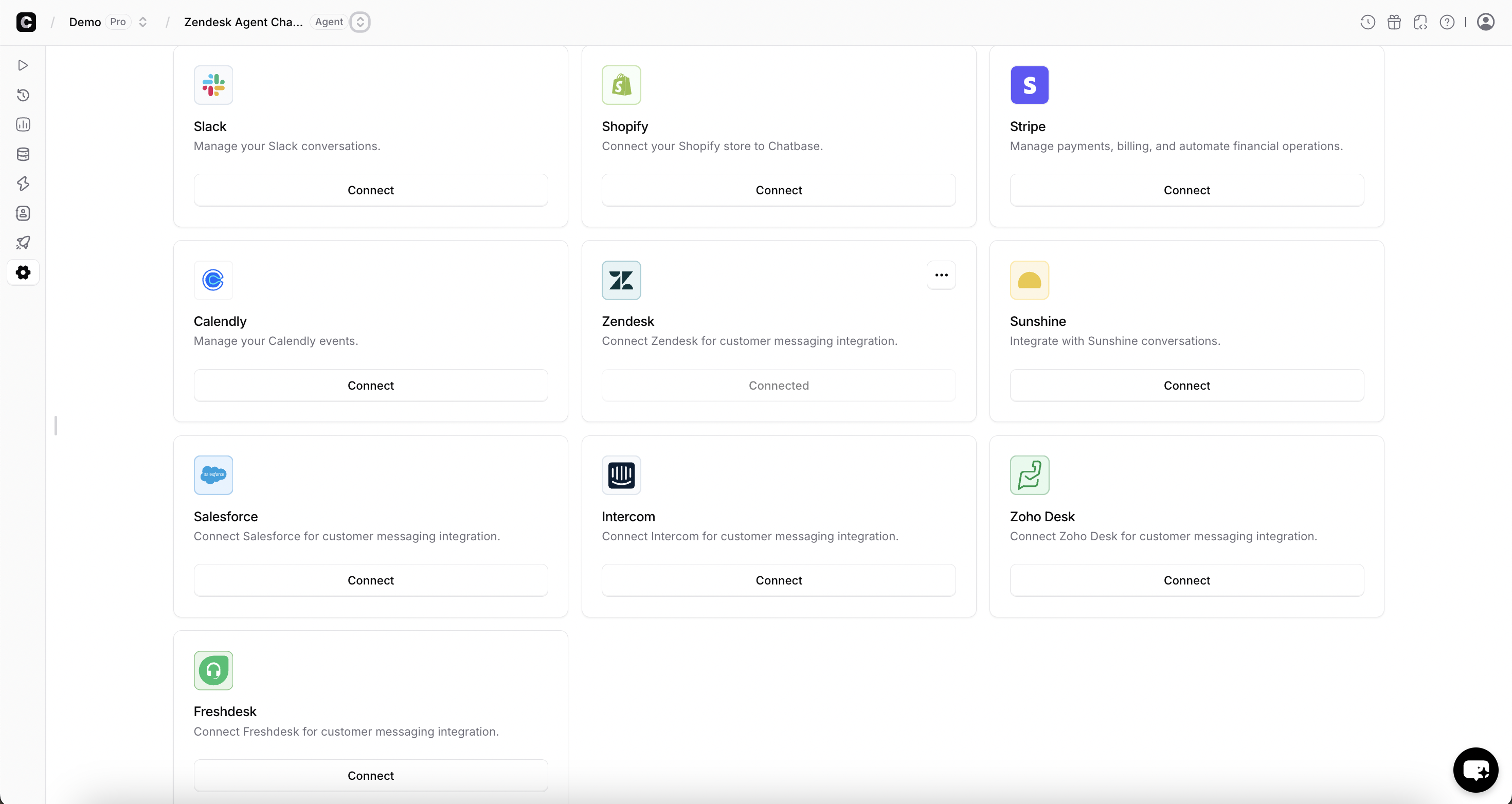
Before creating this action, you must first connect your helpdesk platform under **Settings → Integrations**.
Supported platforms:
* Chatbase
* Zendesk
* Salesforce
* Intercom
* Zoho Desk
* Freshdesk
* HubSpot
* Help Scout
 ***
### General
**Action Name:** A descriptive name for this action. This helps the AI Agent understand when to trigger it.
**Example:**
* Escalate\_To\_Human
* Create\_Support\_Ticket
* Handoff\_To\_Agent
**Ticket Platform:** Select the platform where tickets will be created.\
Only platforms that are already integrated under **Settings → Integrations** will appear in this dropdown.
**When to use:** Clearly explain when the AI Agent should use this action.
**Include:**
* What this action does (creates a support ticket or escalates the conversation)
* What data is transferred (chat history, user details, issue summary)
* What updates it makes (notifies human agents, stops AI replies if applicable)
**Example instructions:**
* Use this action when the user asks to speak to a human.
* Use this action when the AI cannot resolve the issue after multiple attempts.
* Use this action for billing disputes, account issues, complaints, or sensitive matters.
* Trigger this action if the user expresses frustration or explicitly requests human assistance.
Example user queries that should trigger escalation:
* "I want to speak to a human."
* "Connect me to support."
* "This didn’t solve my issue."
* "I need help with my billing."
**Channels:** Specify the channels where this action can be used.
For example:
* Chat widget
* Help page
* Whatsapp
Only select the channels where human escalation is operationally supported by your team.
* You should click on the Save & enable button after completing the above configuration.
***
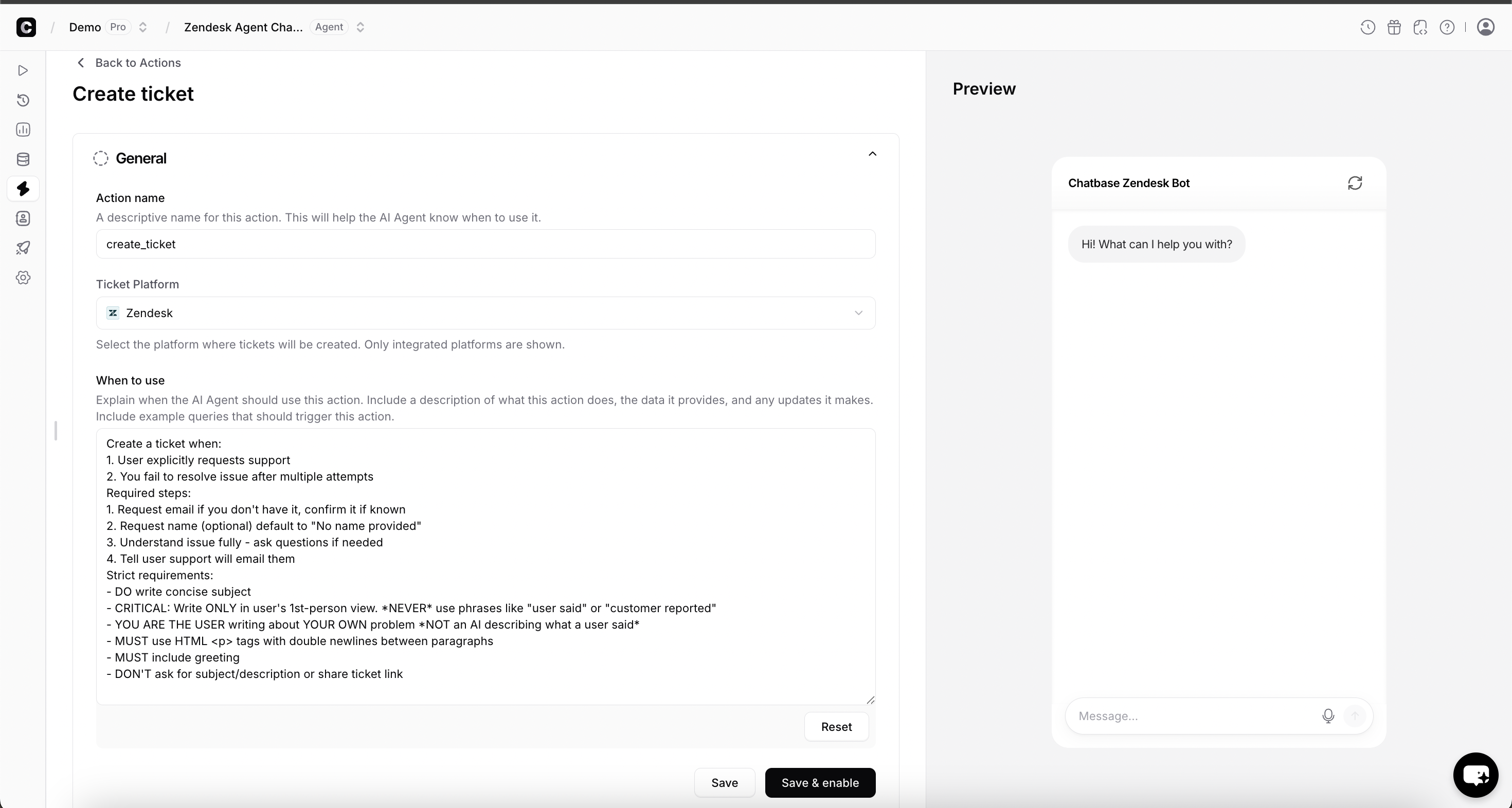
### General
**Action Name:** A descriptive name for this action. This helps the AI Agent understand when to trigger it.
**Example:**
* Escalate\_To\_Human
* Create\_Support\_Ticket
* Handoff\_To\_Agent
**Ticket Platform:** Select the platform where tickets will be created.\
Only platforms that are already integrated under **Settings → Integrations** will appear in this dropdown.
**When to use:** Clearly explain when the AI Agent should use this action.
**Include:**
* What this action does (creates a support ticket or escalates the conversation)
* What data is transferred (chat history, user details, issue summary)
* What updates it makes (notifies human agents, stops AI replies if applicable)
**Example instructions:**
* Use this action when the user asks to speak to a human.
* Use this action when the AI cannot resolve the issue after multiple attempts.
* Use this action for billing disputes, account issues, complaints, or sensitive matters.
* Trigger this action if the user expresses frustration or explicitly requests human assistance.
Example user queries that should trigger escalation:
* "I want to speak to a human."
* "Connect me to support."
* "This didn’t solve my issue."
* "I need help with my billing."
**Channels:** Specify the channels where this action can be used.
For example:
* Chat widget
* Help page
* Whatsapp
Only select the channels where human escalation is operationally supported by your team.
* You should click on the Save & enable button after completing the above configuration.
 ***
## How It Works
When triggered, the Escalate to Human action will:
* Create a new ticket or conversation in the selected platform
* Transfer the relevant conversation history
* Include user information (if available)
* Allow your human support team to take over
***
## Use Cases
### Explicit Human Request
In this example, the AI agent is instructed to escalate when a user directly asks for human assistance.
Example queries:
* "I want to talk to a real person."
* "Can someone from support contact me?"
* "This is urgent, I need help."
Once triggered, a ticket is created in the selected helpdesk platform, and your team can continue the conversation from there.
***
### Failed Resolution Escalation
In this example, the AI attempts to resolve the issue but cannot provide a sufficient answer.
The action is triggered when:
* The AI confidence is low
* The user repeats the same question multiple times
* The issue involves billing, security, or account access
***
## How It Works
When triggered, the Escalate to Human action will:
* Create a new ticket or conversation in the selected platform
* Transfer the relevant conversation history
* Include user information (if available)
* Allow your human support team to take over
***
## Use Cases
### Explicit Human Request
In this example, the AI agent is instructed to escalate when a user directly asks for human assistance.
Example queries:
* "I want to talk to a real person."
* "Can someone from support contact me?"
* "This is urgent, I need help."
Once triggered, a ticket is created in the selected helpdesk platform, and your team can continue the conversation from there.
***
### Failed Resolution Escalation
In this example, the AI attempts to resolve the issue but cannot provide a sufficient answer.
The action is triggered when:
* The AI confidence is low
* The user repeats the same question multiple times
* The issue involves billing, security, or account access