> ## Documentation Index
> Fetch the complete documentation index at: https://chatbase.co/docs/llms.txt
> Use this file to discover all available pages before exploring further.
# REST API Integration
> Complete guide to integrating Chatbase AI Agents using our REST API for custom integrations and applications.
**Looking for API v2?** The new Chatbase API v2 features structured error codes, cursor-based pagination, and SSE streaming. Note that API v2 is available starting from the Standard Plan. [Check out the API v2 Reference →](/api-v2/overview)
## Overview
The Chatbase REST API enables you to integrate AI-powered conversations into any application or workflow. Build custom chat experiences, automate customer interactions, and manage your AI agents programmatically.
Chat with your AI agents and handle real-time streaming responses
Create, configure, and update AI agents with custom training data
Retrieve conversations, leads, and analytics from your AI interactions
## Quick Start
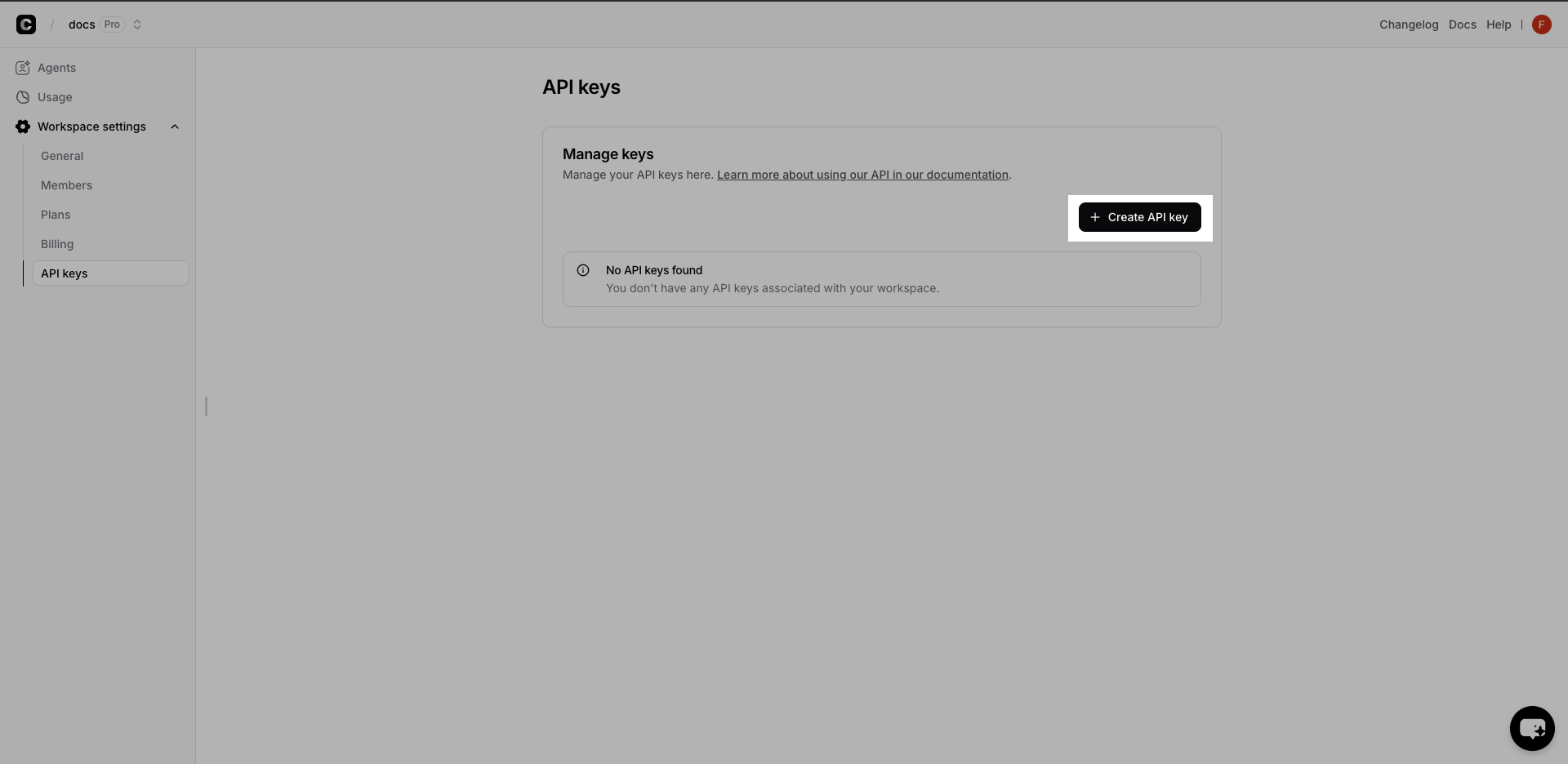 1. Visit your [Chatbase Dashboard](https://www.chatbase.co/dashboard)
2. Navigate to **Workspace Settings** → **API Keys**
3. Click **Create API Key** and copy the generated key
Store your API key securely and never expose it in client-side code.
1. Visit your [Chatbase Dashboard](https://www.chatbase.co/dashboard)
2. Navigate to **Workspace Settings** → **API Keys**
3. Click **Create API Key** and copy the generated key
Store your API key securely and never expose it in client-side code.
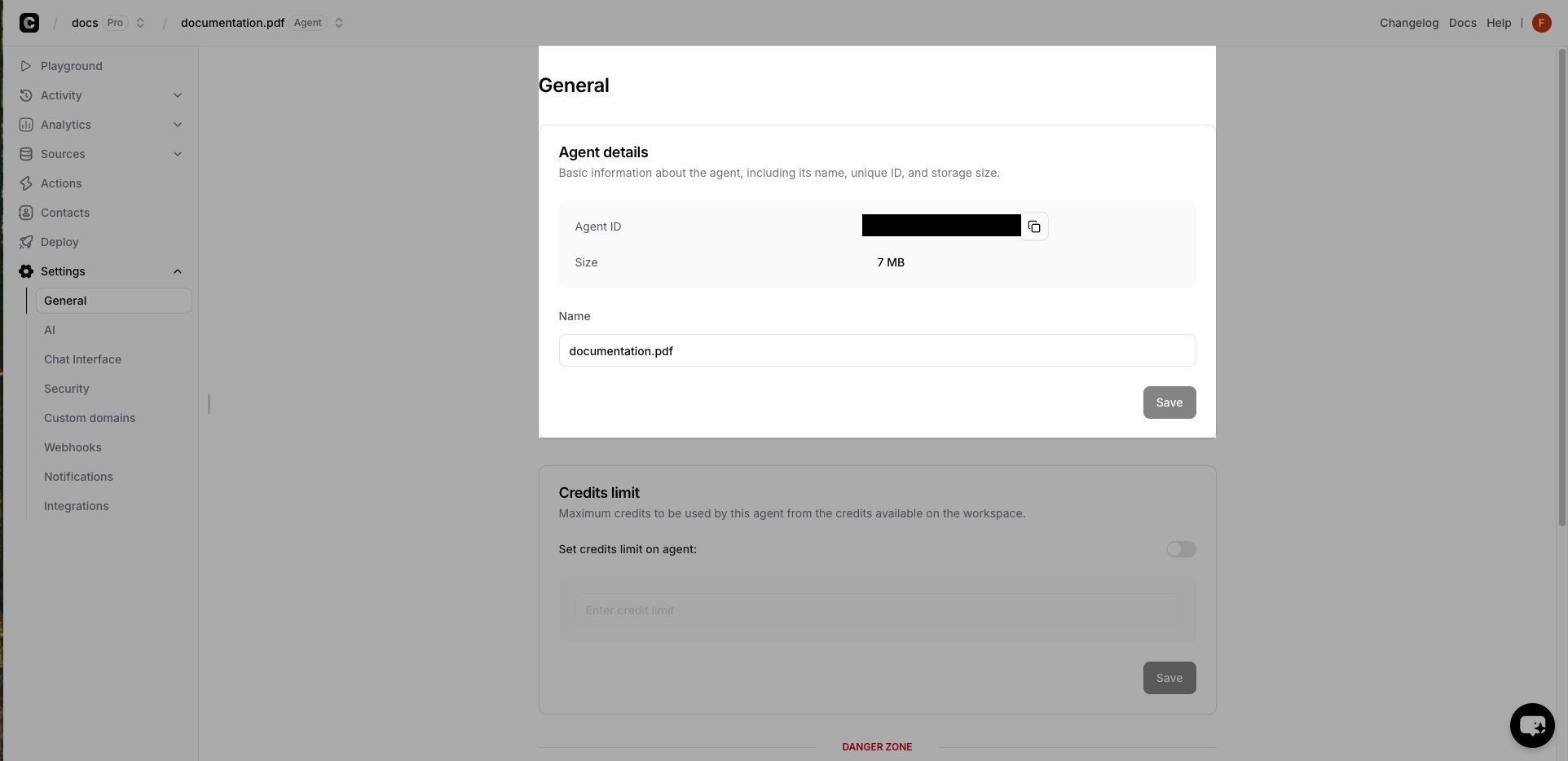 1. Select your AI Agent in the dashboard
2. Go to **Settings** → **General**
3. Copy the **Chatbot ID** (UUID format)
Test your integration with a simple chat request:
```bash theme={null}
curl -X POST 'https://www.chatbase.co/api/v1/chat' \
-H 'Authorization: Bearer YOUR_API_KEY' \
-H 'Content-Type: application/json' \
-d '{
"messages": [{"content": "Hello! How can you help me?", "role": "user"}],
"chatbotId": "your-chatbot-id-here"
}'
```
**Expected Response:**
```json theme={null}
{
"text": "Hello! I'm here to help answer your questions and assist with any information you need. What can I help you with today?"
}
```
### Chat API Streaming
The [chat API](/api-reference/chat) supports real-time streaming responses for better user experience.
```javascript Node.js theme={null}
// streamer.js
const axios = require('axios')
const {Readable} = require('stream')
const apiKey = ''
const chatId = ''
const apiUrl = 'https://www.chatbase.co/api/v1/chat'
const messages = [{content: '', role: 'user'}]
const authorizationHeader = `Bearer ${apiKey}`
async function readChatbotReply() {
try {
const response = await axios.post(
apiUrl,
{
messages,
chatId,
stream: true,
temperature: 0,
},
{
headers: {
Authorization: authorizationHeader,
'Content-Type': 'application/json',
},
responseType: 'stream',
}
)
const readable = new Readable({
read() {},
})
response.data.on('data', (chunk) => {
readable.push(chunk)
})
response.data.on('end', () => {
readable.push(null)
})
const decoder = new TextDecoder()
let done = false
readable.on('data', (chunk) => {
const chunkValue = decoder.decode(chunk)
// Process the chunkValue as desired
// Here we just output it as in comes in without \n
process.stdout.write(chunkValue)
})
readable.on('end', () => {
done = true
})
} catch (error) {
console.log('Error:', error.message)
}
}
readChatbotReply()
```
```python Python theme={null}
## streamer.py
import requests
api_url = 'https://www.chatbase.co/api/v1/chat'
api_key = ''
chat_id = ''
messages = [
{ 'content': '', 'role': 'user' }
]
authorization_header = f'Bearer {api_key}'
def read_chatbot_reply():
try:
headers = {
'Authorization': authorization_header,
'Content-Type': 'application/json'
}
data = {
'messages': messages,
'chatId': chat_id,
'stream': True,
'temperature': 0
}
response = requests.post(api_url, json=data, headers=headers, stream=True)
response.raise_for_status()
decoder = response.iter_content(chunk_size=None)
for chunk in decoder:
chunk_value = chunk.decode('utf-8')
print(chunk_value, end='', flush=True)
except requests.exceptions.RequestException as error:
print('Error:', error)
read_chatbot_reply()
```
## Performance Best Practices
**Optimization Strategies:**
* Use streaming for chat responses to improve perceived performance
* Cache agent responses when appropriate
* Batch multiple operations when possible
* Monitor and optimize conversation context length
## 🚀 Try It Live!
Ready to see the magic in action? Dive straight into our interactive playground where you can test every API endpoint, experiment with real responses, and build your integration in real-time.
Test APIs instantly • No setup required • Real-time responses • Copy working code snippets
### Key API Endpoints
Send messages and receive AI responses with streaming support
Create, update, and configure AI agents programmatically
Access chat history and conversation analytics
Create and manage contacts for your AI agents
1. Select your AI Agent in the dashboard
2. Go to **Settings** → **General**
3. Copy the **Chatbot ID** (UUID format)
Test your integration with a simple chat request:
```bash theme={null}
curl -X POST 'https://www.chatbase.co/api/v1/chat' \
-H 'Authorization: Bearer YOUR_API_KEY' \
-H 'Content-Type: application/json' \
-d '{
"messages": [{"content": "Hello! How can you help me?", "role": "user"}],
"chatbotId": "your-chatbot-id-here"
}'
```
**Expected Response:**
```json theme={null}
{
"text": "Hello! I'm here to help answer your questions and assist with any information you need. What can I help you with today?"
}
```
### Chat API Streaming
The [chat API](/api-reference/chat) supports real-time streaming responses for better user experience.
```javascript Node.js theme={null}
// streamer.js
const axios = require('axios')
const {Readable} = require('stream')
const apiKey = ''
const chatId = ''
const apiUrl = 'https://www.chatbase.co/api/v1/chat'
const messages = [{content: '', role: 'user'}]
const authorizationHeader = `Bearer ${apiKey}`
async function readChatbotReply() {
try {
const response = await axios.post(
apiUrl,
{
messages,
chatId,
stream: true,
temperature: 0,
},
{
headers: {
Authorization: authorizationHeader,
'Content-Type': 'application/json',
},
responseType: 'stream',
}
)
const readable = new Readable({
read() {},
})
response.data.on('data', (chunk) => {
readable.push(chunk)
})
response.data.on('end', () => {
readable.push(null)
})
const decoder = new TextDecoder()
let done = false
readable.on('data', (chunk) => {
const chunkValue = decoder.decode(chunk)
// Process the chunkValue as desired
// Here we just output it as in comes in without \n
process.stdout.write(chunkValue)
})
readable.on('end', () => {
done = true
})
} catch (error) {
console.log('Error:', error.message)
}
}
readChatbotReply()
```
```python Python theme={null}
## streamer.py
import requests
api_url = 'https://www.chatbase.co/api/v1/chat'
api_key = ''
chat_id = ''
messages = [
{ 'content': '', 'role': 'user' }
]
authorization_header = f'Bearer {api_key}'
def read_chatbot_reply():
try:
headers = {
'Authorization': authorization_header,
'Content-Type': 'application/json'
}
data = {
'messages': messages,
'chatId': chat_id,
'stream': True,
'temperature': 0
}
response = requests.post(api_url, json=data, headers=headers, stream=True)
response.raise_for_status()
decoder = response.iter_content(chunk_size=None)
for chunk in decoder:
chunk_value = chunk.decode('utf-8')
print(chunk_value, end='', flush=True)
except requests.exceptions.RequestException as error:
print('Error:', error)
read_chatbot_reply()
```
## Performance Best Practices
**Optimization Strategies:**
* Use streaming for chat responses to improve perceived performance
* Cache agent responses when appropriate
* Batch multiple operations when possible
* Monitor and optimize conversation context length
## 🚀 Try It Live!
Ready to see the magic in action? Dive straight into our interactive playground where you can test every API endpoint, experiment with real responses, and build your integration in real-time.
Test APIs instantly • No setup required • Real-time responses • Copy working code snippets
### Key API Endpoints
Send messages and receive AI responses with streaming support
Create, update, and configure AI agents programmatically
Access chat history and conversation analytics
Create and manage contacts for your AI agents